
How to fill in your ULM logbook (and keep your hours straight)
A practical guide to logging every flight in your ultralight logbook: which fields to fill in, how to count PIC and dual time, and the most common mistakes.
Filling in your logbook looks trivial until your first check ride comes round and you find your totals do not add up. This guide covers flight functions and time recording for ULM pilots in Spain, following AESA’s instructions. Do not apply these categories automatically to other licence types or countries.
The fields of every flight
Each entry in your logbook should include:
- Date: the day of the flight.
- Departure and arrival: ICAO designator, or the location’s name if it has no designator.
- Times: departure, arrival and flight time; check the definition applicable to your record.
- Aircraft: registration and model.
- Pilot in command: full name.
- Function on board: this is where your hours stand or fall.
- Landings: the ULM guide uses the Day column.
- Remarks: information relevant to the flight.
See sections 4.1.2, 4.1.3 and 4.1.8 of the AESA guide linked below for these instructions.
PIC, dual and instructor time for ULM pilots in Spain
The AESA guide LIC-ULM-P01-GU01, edition 01, section 4.1.10, sets out the following entries:
- Pilot in command (PIC): record the time you fly as pilot in command. A student flying solo under the supervision of an instructor on the ground also records PIC time.
- Dual (D.M.): a pilot or student accompanied by an instructor or examiner performing those duties on board records the time as dual.
- Instructor (INS) and PIC: when acting as an instructor or examiner, record the time in both columns. A flight is not restricted to a single function entry.
Example: a one-hour flight
Each row describes one person’s record. On an instructional flight, the student and instructor enter their respective functions in their own logbooks.
| Person recording the flight | PIC | Dual | Instructor | Total flight time |
|---|---|---|---|---|
| Pilot in command, including a student flying solo under ground supervision | 1:00 | — | — | 1:00 |
| Student receiving instruction with an instructor on board | — | 1:00 | — | 1:00 |
| Instructor exercising their privileges on board | 1:00 | — | 1:00 | 1:00 |
| Examiner performing their duties on board | 1:00 | — | 1:00 | 1:00 |
One hour of PIC and one hour of Instructor time still mean one hour of total flight time. Both entries refer to the same flight. Total each function column separately; do not add the function columns together to calculate the flight’s duration.
Section 4.1.12 of the same guide specifies the remarks: the instructor’s signature and licence number for training flights, the examiner’s signature and licence number for flight tests, and the examined person’s full name in the examiner’s record.
A complete entry, field by field
Fictional example: the names, airfield and registration below are invented. They represent a local flight as PIC without instruction. They are not the records of a real person or aircraft.
| Field | Example value |
|---|---|
| Date | 09/09/2026 |
| Departure | Example Airfield, no ICAO designator |
| Arrival | Example Airfield, no ICAO designator |
| Departure time | 09:00 UTC |
| Arrival time | 09:45 UTC |
| Flight time | 00:45 |
| SE (single-engine) | 00:45 |
| Model | Tecnam P92 |
| Fictional registration | EC-XXX |
| Pilot in command | Alex Vega Martín |
| Function and time | PIC: 00:45; Dual: 00:00; INS: 00:00 |
| Day landings | 2 |
| Remarks | Local flight; circuit practice. |
This example uses UTC to make the time reference explicit; this guide is not stating that UTC is mandatory. The chosen times illustrate a 45-minute interval. Before entering a real flight, check which events count as departure and arrival under the applicable flight-time definition.
Closing a page and carrying totals forward
We continue with fictional data for the same pilot. The page contains three flights: the 00:45 as PIC above, another of 01:10 as instructor and PIC, and one of 00:35 receiving dual instruction. They have 2, 3 and 1 day landings respectively.
The page’s duration is 45 + 70 + 35 = 150 minutes = 02:30. PIC totals 45 + 70 = 115 minutes = 01:55. The 70 instructor minutes are already included in total flight time.
| Column | Previous | Page | Cumulative |
|---|---|---|---|
| Total time | 100:20 | 02:30 | 102:50 |
| PIC | 80:00 | 01:55 | 81:55 |
| Dual | 20:20 | 00:35 | 20:55 |
| Instructor | 15:00 | 01:10 | 16:10 |
| Day landings | 200 | 6 | 206 |
Add each row horizontally: previous plus page equals the cumulative figure to carry forward to the next page. Do not add PIC, dual and instructor vertically to calculate total flight time. Do not treat 01:10 as 1.10 hours either: it means 70 minutes.
Before closing the page, check the three entries against their original records, including landings as well as time. If you are moving from paper, the guide to switching to a digital record explains how to avoid counting your opening balance twice.
Selecting instructor in JustLogbook
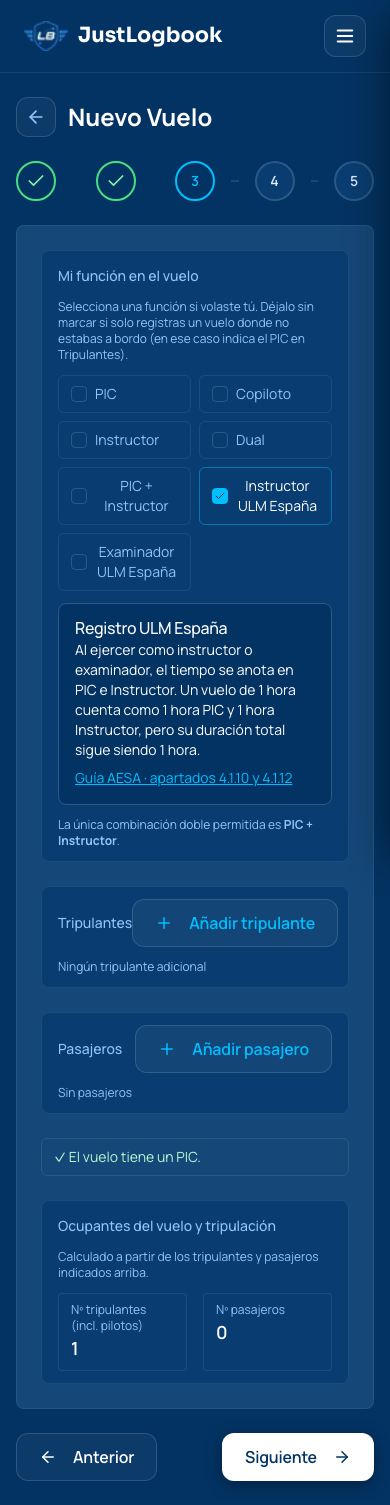
Real screenshot of the web interface in Spanish. It illustrates the Instructor ULM España selection and its PIC + Instructor explanation; it does not show all the details of the fictional flight above.
When reviewing an instructional flight, check the two function columns and total duration separately. The second flight in the example should show 01:10 PIC, 01:10 Instructor and 01:10 total flight time.
Common mistakes that will cost you
- Adding up by hand at the end of a page: sooner or later an error slips through.
- Missing day landings: check each flight’s count before closing the page.
- Not logging the flight the same day: memory is unreliable about exact times.
- Mixing time formats (local vs. UTC) between flights.
The shortcut: let the system do the totals
If you keep your logbook digitally, PIC, dual and instructor times and landings are calculated as you log. In JustLogbook, PIC + Instructor preserves the time in both functions without doubling the flight duration. You only enter the flight details — or dictate them over WhatsApp once you are on the ground — and the totals stay correct and ready to export.
Logging properly today saves you a headache the day you have to account for your hours. If you also share an aircraft, the aircraft logbook keeps its airframe hours separately. And if you fly in Spain, see exactly what RD 182/2026 requires and how to meet it.